Volume Bass Booster, Equalizer
ZANKHANA PTE LTDMusic & Audio
4.72.34K Reviews
- Version
- 1.1.0.2
- Installs
- 10.00M
- Age Rating
- Everyone
Screenshots
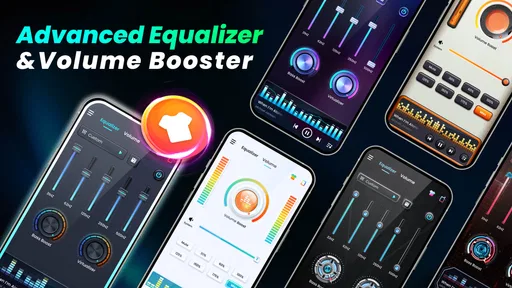
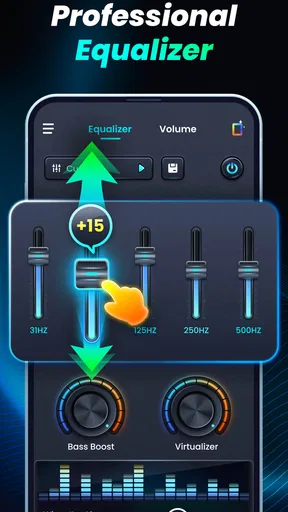
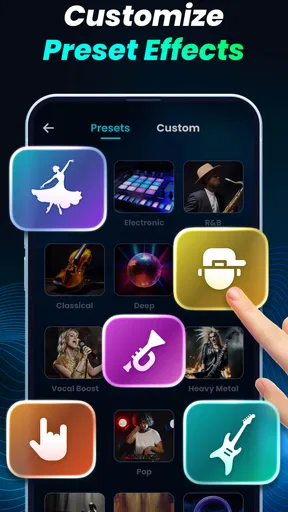

Our Review of Volume Bass Booster, Equalizer
 Analysis by Appyee
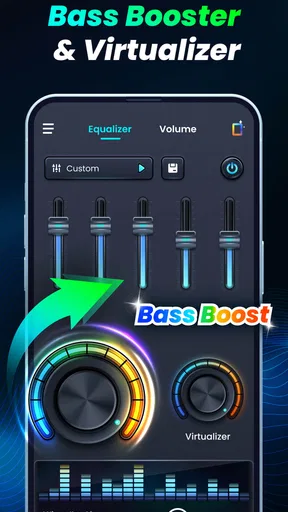
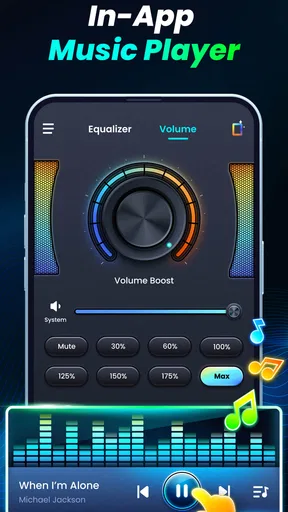
I spent time with Volume Bass Booster, Equalizer as a practical audio tool rather than treating it as a simple “make everything louder” switch. It is an Android music and audio app from ZANKHANA PTE LTD, built around bass adjustment, equalization, and extra volume for a phone or connected speaker. My overall impression is that it can make a noticeable difference when a device sounds thin or quiet, but its real value depends on how carefully you use the controls and what kind of listening situation you have.
The app is free to install, with optional in-app purchases ranging from $2.99 to $11.99 per item. It is rated for Everyone, supports Android 6.0 and later, and has reached over 10 million installs. Its current version is 1.1.0.2, while the app was released on April 26, 2024. Those details make it approachable for a wide range of Android users, including people using older phones, although the experience can still vary depending on the phone’s speaker, headphones, operating system, and music player.
How the interface affects readability and navigation
When I open an audio booster, I want to understand the main action immediately. This app’s purpose is easy to grasp: adjust the sound, increase bass, or raise the output level. That direct focus is useful for anyone who finds complicated audio software intimidating. You do not need to understand studio terminology before trying a small change, which lowers the entry barrier for casual listeners.
That simplicity also matters for people who have difficulty processing crowded interfaces. A music-production application may expose many technical controls at once, while Volume Bass Booster, Equalizer is aimed at a more immediate task. I found it more suitable for a quick adjustment before listening to a podcast, watching a video, or playing music than for detailed audio engineering. The shorter path from opening the app to changing the sound is one of its strongest practical qualities.
Still, audio controls are not automatically easy to interpret. A slider can show that something is being increased without explaining what the result will sound like on a particular phone. Bass that feels pleasantly fuller through headphones may become boomy through a small built-in speaker. Someone with limited technical confidence may need to move one control at a time and listen carefully instead of changing several settings together.
I recommend starting with a modest adjustment and checking the result at a comfortable listening level. This is more useful than immediately pushing every control to its maximum. It also gives you a clearer idea of which change is helping. If the interface presents several controls close together, using deliberate taps and pauses is preferable to quickly dragging across the screen, especially for users who have reduced precision or hand stability.
The app’s free entry point is helpful here. A person can try the basic experience before deciding whether optional purchases are worthwhile. That is particularly important for users who need to judge visual clarity, control size, and responsiveness for themselves. Accessibility is personal: a layout that feels obvious to one person may feel cramped or unclear to another, and an audio tool cannot solve that difference by sound processing alone.
What the controls are good at in everyday listening
The strongest use case is correction rather than transformation. If a phone speaker sounds weak at normal listening levels, a little extra bass or volume may make music feel more present. If voices in a video seem too thin, a balanced equalizer adjustment can make the sound less tiring to follow. I would treat the app as a way to fine-tune an existing device, not as a replacement for a better speaker or headphones.
There is also a useful distinction between loudness and clarity. Raising volume can make quiet content easier to hear, but it can also make harshness more obvious. Increasing bass may add warmth, yet it can cover speech or reduce the separation between instruments. For that reason, I found the app most effective when I used small changes for a specific problem instead of trying to create the biggest possible sound.
People who are sensitive to sharp treble or who prefer a fuller sound may appreciate the ability to shape the balance. However, the same flexibility can become frustrating if a user has difficulty judging subtle frequency changes. In that situation, a simpler player with a few clear sound presets may be easier to manage. Volume Bass Booster, Equalizer is more useful when you want control, even if you only use a small part of it.
Motor and sensory considerations during use
From a motor-access perspective, the most important question is whether you can adjust the controls without accidental jumps. Audio sliders often require a controlled touch, and that can be challenging for users with tremors, limited dexterity, or difficulty maintaining contact with the screen. My practical advice is to make one adjustment, release the screen, and listen before making another. That workflow reduces the chance of overshooting the setting.
It is also worth using the app while seated or with the phone supported, rather than trying to tune sound while walking. A stable phone makes fine adjustments easier and avoids the common problem of changing a setting unintentionally when your finger slips. This is a small habit, but it makes the experience more predictable.
For users with hearing differences, the equalizer can be more useful than a general volume boost because it allows attention to shift toward the parts of sound that are easiest to follow. That does not mean it can compensate for every hearing need. The result depends on the content, the speaker or headphones, and the listener’s own hearing profile. I would use it as a personal listening aid for media, not as a medical device or a substitute for professionally fitted equipment.
Sensory comfort is another area where restraint matters. A strong bass effect can feel exciting for music but unpleasant in a small room, on a resonant surface, or through headphones that already emphasize low frequencies. Sudden loudness can also be uncomfortable. I recommend changing the level before starting a long listening session and then lowering it if the sound becomes tiring. More output is not always more accessible.
People who are sensitive to unpredictable sound may prefer to keep a conservative setting and avoid frequent experimentation. A stable adjustment can be less stressful than repeatedly switching between extreme effects. Conversely, someone who struggles to hear a quiet video in a noisy environment may value the ability to make a temporary change and then return to a gentler level afterward.
A realistic phone-and-speaker routine
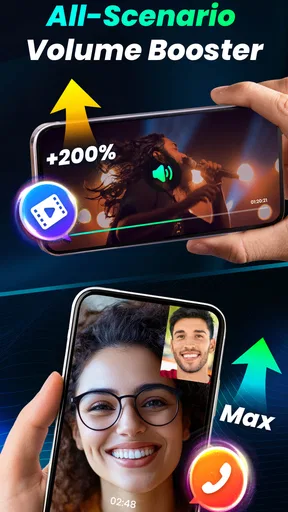
Imagine using an Android phone in the kitchen while preparing dinner. The built-in speaker is competing with water, appliances, and movement, so speech in a video is difficult to follow. I would open the app before starting the video, raise the output carefully, and use the equalizer to avoid making the voice muddy. After the video, I would restore a lower setting before switching to headphones or a quieter room.
This scenario shows why the app can be convenient but also why it needs attention. A setting that helps in a noisy kitchen may be excessive beside your bed. If another person is nearby, a louder speaker may also disturb them. The ability to adjust sound does not remove the need to consider the environment.
For a user with limited reach or reduced hand control, preparing the setting in advance is easier than trying to change it repeatedly during playback. For a user with visual fatigue, short sessions with clear listening goals may be more comfortable than exploring every control. These are not special modes inside the app; they are practical ways to make a general audio tool fit different abilities and routines.
Situational access across devices and environments
The app makes the most sense when the phone itself is the weak point. If your headphones already have a strong amplifier and a well-tuned companion application, adding another booster may provide little benefit. Likewise, an external speaker with its own equalizer may offer more consistent control. In those cases, the hardware’s controls are often easier to understand because they are designed for that specific output device.
Compared with a normal music player, this app is more focused on system-level sound adjustment rather than library management or playback organization. Compared with a dedicated equalizer built into a phone or headphone brand’s software, it may be a more general-purpose option. The trade-off is that a device-specific tool may behave more predictably with its own hardware, while this app is attractive when you want one place to try adjustments across ordinary Android listening situations.
I would be cautious when switching between output types. A setting that sounds balanced through the phone speaker may be too bass-heavy through earbuds. If you frequently move between speakers, wired headphones, and wireless devices, you may need to check the sound each time. That extra step is a real limitation for anyone looking for a completely automatic experience.
The app can also be useful for older Android phones that lack sophisticated built-in audio controls. Since it supports Android 6.0 and later, it is not restricted to only recent devices. However, compatibility with the operating system does not guarantee identical results on every model. Phone manufacturers handle audio processing differently, and some devices may already apply their own volume limits or sound effects.
For people who rely on captions, the app can complement rather than replace them. Better sound may make speech easier to follow, but captions remain valuable when the recording is poorly mixed, the surroundings are loud, or the speaker has an unfamiliar accent. I would not treat a volume increase as a complete solution for communication access.
There is a similar point for people who use screen readers or enlarged display settings. The app may be usable alongside Android’s accessibility features, but the practical experience depends on how its controls are exposed by the phone. Users who depend heavily on spoken navigation should test the main controls before committing to a long-term workflow. If the controls are not announced clearly or are difficult to reach, a built-in audio panel may be a better choice.
Where the free model fits
The free installation makes experimentation straightforward, but optional purchases mean that not every part of the experience should be assumed to be included without checking the screen presented in the app. I prefer this arrangement when the basic controls are enough to evaluate whether the sound changes actually help. Someone who only needs occasional adjustment may have no reason to spend more.
On the other hand, a user who needs a dependable, repeatable audio routine should consider whether optional features are worth the cost before building daily habits around them. The listed purchase range runs from $2.99 to $11.99 per item, so the decision is not simply about downloading the app; it is about deciding whether its extra capabilities improve your particular listening setup.
Remaining barriers and sensible precautions
The biggest barrier is that boosting sound cannot overcome poor hardware indefinitely. A small speaker may distort when pushed too hard, and extra bass can make that distortion more noticeable. If the output becomes rough, rattly, or tiring, lowering the setting is the correct response. Continuing to increase it will not create detail that the speaker cannot reproduce.
Another limitation is the lack of a universal “best” setting. Music, speech, games, and films are mixed differently. A setting that works for a quiet spoken recording may make action scenes overwhelming. I recommend treating the app as a situational tool and checking the result whenever the content changes significantly.
People with tinnitus, sound sensitivity, or other hearing concerns should be especially conservative. I would avoid using a booster to compete with traffic, machinery, or loud public spaces. In those conditions, safer headphones, better-fitting ear tips, captions, or moving to a quieter location may be more effective than increasing volume.
There is also a social barrier that is easy to overlook. A louder phone speaker can affect everyone nearby, not just the person using the app. Headphones may solve that problem, but they introduce their own considerations, including comfort, awareness of surroundings, and the way the app interacts with that particular headset. I would test the sound privately before using it in a shared space.
Users who want detailed audio production tools may outgrow this app quickly. It is not the option I would choose for recording, mixing, mastering, or building carefully repeatable studio profiles. A dedicated audio workstation or a hardware-specific equalizer is better for that work. This app is more convincing as a quick Android listening adjustment than as a professional sound laboratory.
Finally, the app should not be confused with accessibility certification or clinical hearing support. Its inclusive value comes from giving people another way to shape everyday audio, not from replacing specialized equipment. That distinction matters because a user may need captions, hearing technology, a different speaker, or professional advice in addition to any software adjustment.
My inclusive verdict on the listening experience
After using Volume Bass Booster, Equalizer with accessibility and context in mind, I see it as a useful, low-commitment option for Android listeners who want more control over bass, balance, or output level. Its free starting point, Everyone age rating, broad Android support, and straightforward purpose make it approachable. The app’s popularity is reflected in its 4.7 average from around 53 thousand ratings and more than 2.3 thousand written reviews, but the important question is still whether its adjustments suit your ears and hardware.
I would recommend it to someone whose phone sounds too thin, whose videos are difficult to hear in ordinary household noise, or who wants to experiment with a fuller sound without replacing the device. I would also suggest it to users who appreciate a focused audio utility rather than a full music player. Start gently, change one control at a time, and check the result whenever you switch from the phone speaker to headphones.
I would skip it if you need professional mixing controls, automatic profiles for every output device, or a guaranteed solution for hearing-related needs. In those situations, a dedicated hardware app, a better speaker, captions, or specialized assistive technology may be more appropriate. I would also avoid relying on it to make a damaged or weak speaker perform beyond its physical limits.
My final recommendation is to treat this as a personal sound-adjustment tool, not a universal volume fix. Used carefully, it can make everyday listening more comfortable and more intelligible for different environments and preferences. Its inclusive strength is flexibility; its main weakness is that the listener still has to judge the result. For many Android users, that balance is worthwhile, especially because the app can be tried before any optional purchase is considered.
Verdict
Strengths of Volume Bass Booster, Equalizer
- Boosts bass noticeably on compatible headphones and speakers.
- Includes presets for quick switching between music styles.
- Simple interface makes basic adjustments easy to find.
- Works with many popular music and streaming apps.
- Compact design uses little screen space while active.
Limitations of Volume Bass Booster, Equalizer
- Results vary significantly depending on the device and headphones.
- Heavy bass boosting may cause distortion at high volume.
- Some features may require the premium version or contain ads.
- Can increase battery usage during extended playback sessions.
- Limited controls may disappoint users seeking advanced audio mixing.
Other Releases by ZANKHANA PTE LTD
View All
Translate - Translator
Productivity4.7
Similar Picks in This Category
View All
YouTube Music
Google LLC4.4

Samsung Music
Samsung Electronics Co., Ltd.3.8

Spotify: Music and Podcasts
Spotify AB4.3

JioSaavn - Music & Podcasts
Saavn Media Limited4.3

Lark Player:Music Player & MP3
Lark Player Studio - Music, MP3 & Video Player4.6

StarMaker: Sing Karaoke Songs
SKYWORK AI PTE. LTD.4.3
Frequently Asked Questions
What is Volume Bass Booster, Equalizer, and what does it do?
Volume Bass Booster, Equalizer is an audio-enhancement app designed to improve the sound produced by your Android device. During testing, its main tools included volume amplification, bass enhancement, and adjustable equalizer controls for shaping music, videos, podcasts, and other media. The exact effect depends on your phone, headphones, speakers, and the audio source, so results may vary between devices.
Can Volume Bass Booster, Equalizer make my music louder than the phone’s standard volume limit?
The app can increase the perceived loudness of compatible audio beyond the normal system settings by applying software amplification. However, it cannot guarantee unlimited volume, and some devices or Android versions may restrict how strongly the boost works. Raising the level too much may cause distortion, clipping, or uncomfortable listening, so it is best to increase the volume gradually and use moderation.
Does the app really improve bass and sound quality?
The bass booster and equalizer can make low frequencies sound more prominent, particularly when using headphones or external speakers with limited bass response. In our experience, moderate adjustments usually produce a clearer and more enjoyable result than extreme settings. Heavy bass enhancement may make audio muddy or distorted, especially with inexpensive speakers, so the best configuration depends on the music and hardware.
Is Volume Bass Booster, Equalizer compatible with all Android phones and audio apps?
Compatibility can differ depending on the Android version, manufacturer-specific audio controls, connected accessories, and the media player being used. The app generally works best with common music and video playback, but certain streaming services, games, Bluetooth devices, or apps may limit access to audio effects. If changes are not noticeable, restarting playback or checking the app’s active status may help.
Is Volume Bass Booster, Equalizer safe to use, and are there any disadvantages?
The app is generally intended for normal audio enhancement, but excessive amplification can damage hearing and may place additional stress on small phone speakers or low-quality headphones. It may also introduce distortion, consume some battery, or display advertisements depending on the version installed. Before downloading, review the permissions, privacy information, and in-app purchase details, and avoid using boosted volume for extended periods.
